Flight 3D behavior for Construct 3
A downloadable behavior
Behavior under construction
Flight 3D — Behavior Documentation
- Attach to any sprite or 3D model along with the Rotate 3D behavior (mikal_rotate_shape) on the same object.
- The plane accelerates using W (Thrust Increase) and decelerates with S (Thrust Decrease).
- The plane must reach Min Takeoff Speed before it can lift off.
- Pull the nose up with Arrow Up (Pitch Up) while at takeoff speed to become airborne.
- Use Arrow Left / Right (Roll Left / Roll Right) to bank and turn.
- The plane turns in the direction of the bank — the more you roll, the faster you turn.
- Release roll keys to return to level flight (when Auto-level is enabled).
- With Auto-level disabled, the plane holds its bank angle and continues turning until you manually correct it.
- Pitch Up while airborne climbs, Pitch Down descends.
- If speed drops below ~60% of Min Takeoff Speed while airborne, the plane enters a stall and loses lift.
- The plane automatically lands when altitude reaches 0.
- Gravity pulls the plane down — you must maintain speed and positive pitch to keep altitude.
- Use
ForceAirborneaction to spawn the plane already in the air. - Use
ForceLandto instantly ground the plane regardless of altitude. - Use
SetThrottle(percent)to set engine power directly (0–100). - Use
SetHeading(degrees)to instantly point the plane in any direction. - Expressions available:
Speed,Altitude,, >code class="bg-text-200/5 border border-0.5 border-border-300 text-danger-000 whitespace-pre-wrap rounded-[0.4rem] px-1 py-px text-[0.9rem]">Pitch,Roll,Heading,VerticalSpeed,SpeedPercent. - Conditions available:
IsAirborne,IsOnGround,IsStalling. - Triggers available:
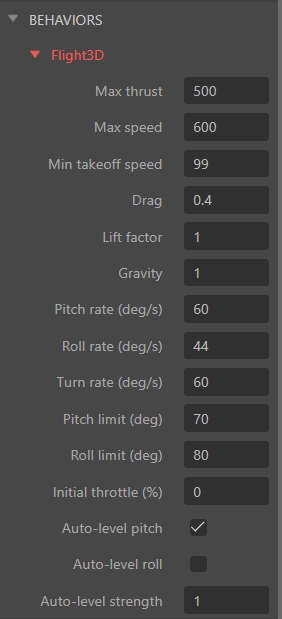
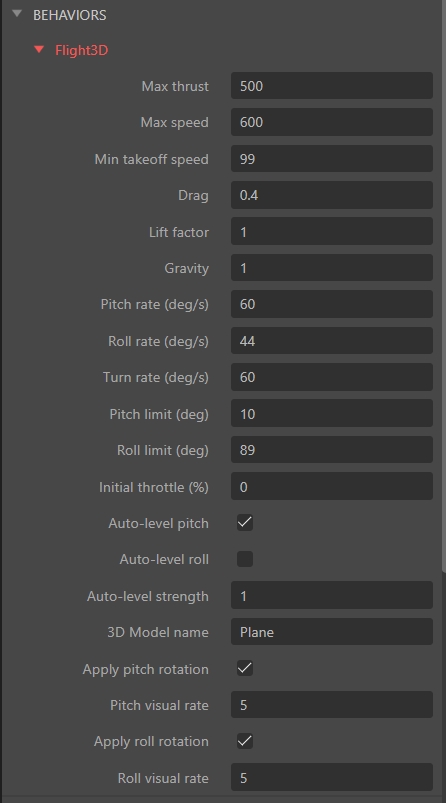
OnTakeoff,OnLand— fire once at the moment of takeoff or landing. - Tune Lift Factor and Gravity to adjust how easily the plane climbs.
- Tune Drag to control how quickly the plane slows down when throttle is reduced.
- Tune Pitch Rate and Roll Rate to adjust control sensitivity.
- All physics values are in pixels per second — scale your layout and object sizes accordingly.

Download
Click download now to get access to the following files:
Development log
- Update 1 Better controls3 hours ago
Leave a comment
Log in with itch.io to leave a comment.